
Frequently Asked Questions
Check out our FAQs below to find answers to many of your questions. Not finding what you need? Submit a request through our Customer Care center or give us a call at (603) 890-2474.
- All
- Andover
- Andover-Copier and Printer Sales
- Andover-MPS
- Andover-Office Equipment Services
- Engineering
- Equipment Service
- FAQ page
- General Account & Support - CB
- Intelligent Document Processing
- Location Page
- Location-Specific Questions - CB
- Managed Print
- Managed Print Services - CB
- Nashua
- Nashua-Copier and Printer Sales
- Nashua-MPS Services
- Nashua-Office Equipment Services
- Ordering Supplies - CB
- Products
- Products & Equipment - CB
- Sales
- Service
- Service & Repairs - CB
Yes. Benchmark supports small and mid-sized businesses in Nashua with copier service, printer maintenance, toner support, equipment recommendations, and Managed Print Services. The right plan depends on the number of users, print volume, device age, workflow needs, and budget.
A copier or printer may be worth replacing if it breaks down frequently, produces inconsistent print quality, lacks current security features, no longer supports your workflow, or costs too much to maintain. Benchmark can review your equipment and help determine whether repair, replacement, leasing, or Managed Print Services makes more sense.
Yes. Managed Print Services can help reduce printing problems by monitoring devices, tracking usage, coordinating toner, identifying recurring issues, and recommending better device placement or equipment changes. MPS is especially useful for businesses with multiple printers, departments, or recurring supply and service issues.
Yes. Benchmark can help Nashua businesses with toner and supply management for supported office printers and copiers. For businesses enrolled in Managed Print Services, toner monitoring and supply coordination may be included as part of the print management program.
Yes. Benchmark offers service options that may include maintenance, repair support, toner or supply coordination, parts coverage, and technical support depending on the equipment and agreement. A service contract can help make office equipment support more predictable.
Yes. Preventive maintenance can help extend equipment life, reduce emergency service calls, improve print quality, and prevent small issues from becoming larger interruptions. Businesses with high-volume print environments often benefit from a regular maintenance plan.
You can contact Benchmark Office Systems by phone or through the website to request copier or printer service. When scheduling service, it helps to provide the equipment model, a description of the issue, any error messages, and whether the problem affects one user, one device, or multiple people in the office.
Response time depends on the issue, equipment, service agreement, technician availability, and location. Benchmark’s goal is to help Nashua businesses minimize downtime with responsive local support, remote troubleshooting when appropriate, and onsite service when needed.
Yes. Benchmark provides copier and printer repair support for businesses in Nashua and surrounding Southern New Hampshire communities. Service may include troubleshooting paper jams, print quality issues, connectivity problems, scanning issues, error codes, and other common copier or printer problems.
Benchmark Office Systems provides office equipment services for Nashua businesses, including copier repair, printer maintenance, preventive maintenance, toner and supply management, Xerox support, Managed Print Services, and office equipment recommendations.
The best first step is a print environment assessment. Benchmark can review your current printers, copiers, print volume, supply process, service issues, and workflow needs. From there, Benchmark can recommend a Managed Print Services plan for your Nashua business.
Yes. Managed Print Services can help businesses identify outdated devices, improve print controls, support secure printing practices, and recommend equipment or workflows that better fit the organization’s document needs. This is especially useful for offices that handle sensitive records or shared devices.
Yes. Managed Print Services can be useful for small businesses that want fewer printer interruptions, better supply management, more predictable costs, and less time spent troubleshooting office printing problems. Smaller offices often benefit from having a local provider monitor and support their print environment.
Managed Print Services may cover office printers, copiers, multifunction printers, and networked print devices. Benchmark can review your existing equipment and determine which devices should be monitored, serviced, replaced, consolidated, or added to a managed print plan.
Managed Print Services can use device monitoring and reporting tools to track printer activity, supply levels, service needs, device performance, and usage patterns. This helps identify high-cost devices, recurring problems, and opportunities to improve the print environment.
If a covered device has a problem, Benchmark can help coordinate service and support based on your Managed Print Services agreement. The goal is to reduce downtime, resolve issues quickly, and keep your print environment operating reliably.
Yes. Supply management is often one of the biggest benefits of Managed Print Services. Benchmark can help monitor toner levels, coordinate supply fulfillment, and reduce the chance of employees running out of toner at the wrong time.
Managed Print Services can help reduce printing costs by identifying waste, monitoring usage, reducing unnecessary color printing, improving device placement, consolidating underused equipment, and preventing emergency supply orders. Better visibility into print activity helps businesses make more informed decisions.
Benchmark’s Managed Print Services may include device monitoring, copier and printer performance management, automated toner and supply coordination, service support, usage reporting, print fleet optimization, and recommendations for improving efficiency. The exact plan depends on your current equipment, print volume, and business needs.
Managed Print Services, or MPS, are ongoing services that help businesses monitor, manage, and improve their office printing environment. This can include printer and copier monitoring, toner management, service coordination, usage reporting, device recommendations, and workflow support.
You can contact Benchmark Office Systems to review your current equipment, print volume, workflow needs, and budget. From there, Benchmark can recommend copier, printer, leasing, service, or Managed Print Services options that fit your business.
A business should consider replacing equipment when breakdowns become frequent, print quality declines, parts or supplies are harder to obtain, security features are outdated, or the device no longer supports current workflow needs. Older equipment can create hidden costs through downtime, service calls, and inefficient printing.
Yes. Benchmark can help with delivery, setup, installation, and configuration for eligible copier and printer systems in Nashua and surrounding areas. This may include connecting the device to the network, setting up print and scan functions, and helping users understand the basic workflow.
Yes. Managed Print Services can help reduce waste, improve supply management, monitor print usage, reduce downtime, and give businesses better visibility into printing costs. For offices with multiple devices, MPS can also help standardize equipment and improve efficiency across departments.
A service agreement may include routine maintenance, repair support, toner or supply management, parts coverage, and access to local technical support. The exact coverage depends on the equipment, agreement type, and business needs. Benchmark can review the options before you choose a device or plan.
Yes. Benchmark provides local copier and printer service for Nashua businesses and nearby Southern New Hampshire communities. Service options may include maintenance, repairs, supplies, troubleshooting, and support agreements depending on the equipment and service plan.
Yes. Many Nashua businesses lease copiers and printers because leasing can reduce upfront costs, make budgeting more predictable, and provide a path to updated technology over time. Leasing may also allow service, maintenance, supplies, and support to be bundled into one agreement.
The right device depends on your monthly print volume, number of users, color printing needs, scanning requirements, security needs, and whether your team needs basic printing or more advanced document workflows. Benchmark can assess your current setup and recommend equipment that fits the way your office actually works.
Yes. Benchmark Office Systems provides copier and printer sales, leasing options, multifunction printers, and managed print support for businesses in Nashua and throughout Southern New Hampshire. We help organizations choose equipment based on print volume, workflow needs, budget, security requirements, and service expectations.
Benchmark offers Xerox copiers, office printers, multifunction printers, and production-capable systems for business environments. Options may include black-and-white printers, color printers, multifunction devices with print, copy, scan, and fax capabilities, and systems designed for larger workgroups or higher-volume use.
Benchmark supports Managed Print Services for businesses in Andover and nearby Merrimack Valley communities, including downtown Andover, the Phillips Academy area, Shawsheen Village, Ward Reservation business areas, Merrimack Valley commercial corridors, Northern Massachusetts, and Southern New Hampshire.
Your business may benefit from MPS if employees often complain about printers, toner ordering feels disorganized, printing costs are rising, devices break down frequently, or no one has clear visibility into print usage. MPS is especially helpful when printing has become a recurring operational distraction.
Yes. MPS can be useful for small businesses that rely on multiple printers, frequently run out of toner, have recurring service issues, or lack internal IT resources for printer support. A smaller office does not always need a complex plan, but it can still benefit from predictable support and better print cost control.
If a covered printer or copier has an issue, Benchmark can provide troubleshooting, service support, and maintenance based on your MPS agreement. Local support is important because print problems can disrupt daily work, especially when multiple employees depend on the same device.
Benchmark can use print monitoring tools to track device usage, supply levels, service needs, and print activity across your printer fleet. This helps identify inefficient devices, recurring problems, excessive usage, and opportunities to reduce costs or improve workflow.
Yes. Managed Print Services can include toner monitoring, supply ordering, and replenishment scheduling. This helps prevent last-minute toner shortages, over-ordering, and excess inventory. For busy offices, automated supply management can reduce interruptions and take routine printer supply tasks off internal staff.
Managed Print Services can reduce printing costs by identifying high-cost devices, tracking print usage, reducing unnecessary color printing, preventing supply waste, consolidating underused equipment, and improving maintenance planning. Better visibility helps businesses make smarter decisions about their print environment instead of reacting to problems after they happen.
Benchmark’s Managed Print Services may include printer and copier monitoring, automated toner replenishment, supply management, device maintenance, usage reporting, print cost analysis, workflow recommendations, and local service support. The exact plan depends on your equipment, print volume, office layout, and business needs.
Managed Print Services, or MPS, are ongoing services that help businesses monitor, maintain, and optimize their printers, copiers, toner, supplies, and print workflows. For Andover businesses, MPS can help reduce print-related costs, prevent supply shortages, improve uptime, and make office printing easier to manage.
Benchmark supports businesses in Andover and nearby Merrimack Valley communities, including downtown Andover, Shawsheen Village, the River Road corridor, Andover Business Park, North Reading, Tewksbury, and surrounding Northern Massachusetts and Southern New Hampshire communities.
Yes. Managed Print Services can be paired with copier or printer purchases or leases to help manage supplies, usage tracking, maintenance, service needs, and print-related costs. This can be useful for businesses with multiple devices, growing print volumes, or limited internal IT support.
Yes. Benchmark provides local service and support after installation, including copier repair, printer maintenance, troubleshooting, supplies, and support agreements. This is important because the lowest equipment price is not always the best value if service response, maintenance, and supplies are unreliable.
Yes. Benchmark can provide delivery, setup, and implementation support for copiers and printers in the Andover area. Setup may include device placement, network connection, print driver configuration, scanning setup, and user support so your team can begin using the equipment correctly.
Yes. Benchmark works with small businesses in Andover and nearby Merrimack Valley communities to recommend equipment that fits their real usage. For many small offices, the best solution is not the biggest machine. It is the device that fits daily workload, budget, space, and support needs.
The best copier or printer depends on monthly print volume, color versus black-and-white usage, scanning needs, number of users, paper sizes, security requirements, and whether your team needs advanced workflow features. Choosing the wrong device can lead to higher costs, slow performance, or unnecessary service issues.
Buying may make sense if your business wants long-term ownership and has predictable equipment needs. Leasing may be better if you want lower upfront costs, easier upgrades, and a more predictable monthly expense. Benchmark can help compare both options based on your budget, usage, and replacement timeline.
Yes. Benchmark provides Xerox multifunction printers for Andover businesses that need printing, copying, scanning, and fax capabilities in one device. Multifunction printers are often a good fit for offices that want to reduce equipment clutter, improve document workflows, and support multiple users from one shared machine.
Benchmark offers Xerox business machines, including multifunction printers, office copiers, color printers, black-and-white printers, and devices designed for small offices, workgroups, and higher-volume business environments. The right option depends on monthly print volume, color usage, paper handling, scanning needs, and office workflow.
Benchmark Office Systems helps Andover-area businesses choose, purchase, lease, and support business copiers, printers, and Xerox multifunction printers. We work with local offices to match equipment to print volume, scanning needs, workflow requirements, budget, and long-term support needs.
Benchmark supports businesses in Andover and nearby Merrimack Valley communities, including downtown Andover, Shawsheen Village, Ballardvale, and surrounding Northern Massachusetts and Southern New Hampshire areas.
Yes. Benchmark can help small businesses compare copier, printer, and multifunction printer options based on print volume, color needs, scanning requirements, security needs, budget, and office workflow. This is useful when a business has outgrown a desktop printer or is replacing aging equipment.
Repair may make sense if the device is relatively current, the issue is isolated, and the total cost is reasonable. Replacement may be smarter if the machine has frequent breakdowns, rising service costs, slow performance, poor scan features, or no longer fits your office workflow. Benchmark can help evaluate both options.
Managed Print Services can help businesses control print costs, reduce supply-related interruptions, monitor usage, improve device performance, and simplify printer support. For offices with multiple users, departments, or devices, MPS can make print management more predictable and less time-consuming.
Yes. Benchmark can help Andover-area businesses with toner and office equipment supplies, including support for Xerox devices. Using the correct supplies helps protect print quality, reduce avoidable service issues, and keep office equipment running reliably.
Yes. Preventative maintenance helps reduce emergency service calls, extend equipment life, improve print quality, and catch worn components before they cause downtime. This is especially useful for busy offices that rely on printers and copiers throughout the workday.
You can request service by contacting Benchmark Office Systems directly or using the service/contact options on the website. For the fastest help, include the equipment model, the issue you are seeing, any error code, and whether the problem affects printing, copying, scanning, or network connectivity.
Response time depends on the type of issue, service agreement, technician availability, and parts requirements. If your copier or printer is affecting daily operations, contact Benchmark directly so the team can review the problem and advise on the fastest available service option.
Yes. Benchmark provides copier and printer repair for businesses in Andover and nearby Merrimack Valley communities. Common service needs include paper jams, error codes, print quality problems, scanning issues, connectivity problems, and recurring equipment failures.
Benchmark Office Systems supports Andover businesses with copier repair, printer service, preventative maintenance, toner and supplies, Managed Print Services, and Xerox office equipment support. We help local offices reduce downtime, improve print reliability, and keep daily document workflows moving.
Yes. Benchmark Office Systems supports Xerox multifunction printers that combine printing, scanning, copying, and faxing into one device.
Yes. Managed Print Services can help reduce unnecessary printing, improve device efficiency, reduce waste, and provide better visibility into overall print expenses.
Yes. We provide toner and supplies for supported copier and printer systems serving Andover businesses.
Yes. Benchmark is a strong fit for growing engineering firms that need reliable print, scan, secure document handling, and workflow support without adding unnecessary enterprise complexity.
Yes. Benchmark can assess your current volumes, document types, quality requirements, and service needs to recommend wide-format solutions for CAD drawings, plan sets, and technical documents.
Yes. Depending on the devices and software in place, Benchmark can help configure print tracking by user, department, client, or project number.
Yes. Benchmark Office Systems is based in Londonderry, NH and supports engineering firms throughout Southern New Hampshire, Northern Massachusetts, the Merrimack Valley, and Greater Boston area.
Yes. Our solutions scale across teams and locations while maintaining centralized oversight. We can deploy consistent print rules and billing codes across your headquarters and remote satellite offices, ensuring a unified workflow.
Yes. We deploy secure print release, access controls, and encrypted workflows to help protect sensitive project information. This ensures that proprietary designs never sit unattended in an output tray.
Benchmark does not control how your team names, stores, reviews, or approves engineering files. However, the right print, scan, and workflow setup can help reduce common document-handling problems, such as outdated plan sets being printed, routed to the wrong place, or left unsecured.
Yes. We assess your specific document types, volumes, and quality requirements to recommend wide-format solutions that support technical engineering documentation, including waterproof and tear-resistant media for field use.
Please note: Not all machines will look like this, but all information is here. You may just need to navigate differently than described.
There are 3 major things to check when troubleshooting or configuring scan to email
- SMTP configuration (the longest part)
- From field (only if making changes after initial set-up)
- DNS (the machines connected to the internet allowing sending and receiving)
Starting with SMTP
Starting with SMTP
After logging in as an admin you can navigate to the properties tab.
Then navigate to:
Apps → Email → Setup
(if it’s a VersaLink it’s the same path, just a different look)


After clicking, it should look something like this.

SMTP Settings
Starting with SMTP, click Edit on the right-hand side.

A customer may have a different domain, so you will need to look up who their email is hosted with and what the correct SMTP settings are.
For example, an organization using Microsoft 365 would typically use:
- Hostname: smtp.office365.com
However, each customer should use their own provider’s settings. Do not reuse settings from another organization.
Having problems troubleshooting this? Contact Customer Care here.
Authentication
In this step, you need to allow for authentication.
If it’s not enabled, it’s most likely why it’s failing.
Please make sure authentication is selected where required.
If using a Gmail account, you must create an app password through Google’s security settings.
➡️ Use only app passwords generated for your account.
➡️ If you do not have one, contact your email administrator or provider.
Next Tab

Encryption Settings
Select STARTTLS if available.
⚠️ Do not disable server certificate validation unless directed by your IT provider.
If you experience certificate issues, contact IT support rather than bypassing security settings.
If needed for troubleshooting, you can try:
- SSL/TLS with port 465
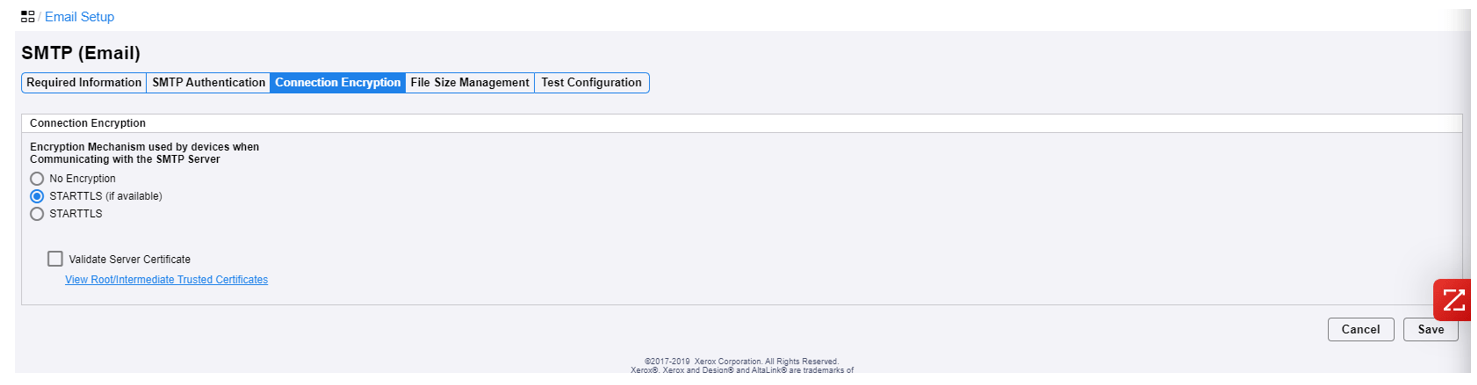
This one is easy just select STARTTLS if available and uncheck validate server certificate while I believe the server has little to do with anything I uncheck it to avoid issues with versa link if you go through everything and it doesn’t work one troubleshooting thing is to try SSL/TLS and use port 465
Next tab
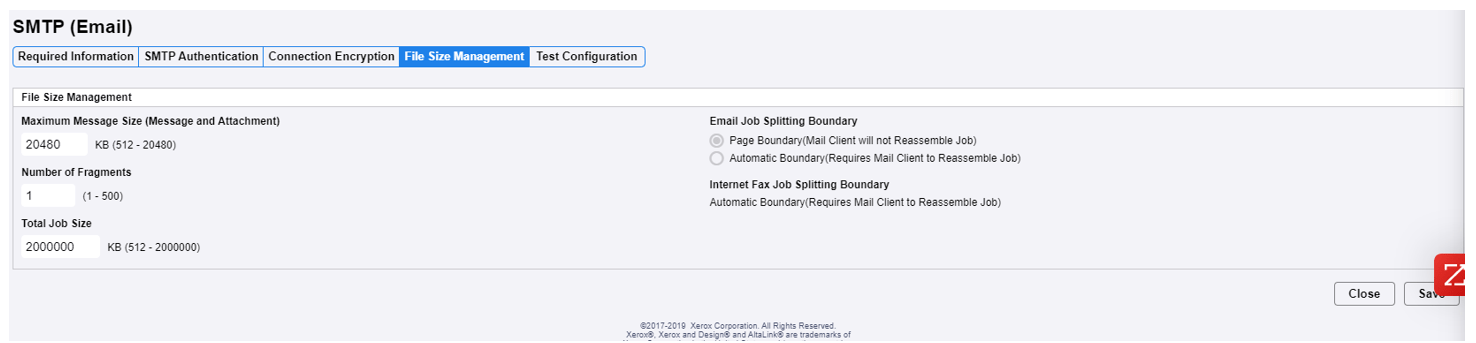
Don’t Touch Anything Here
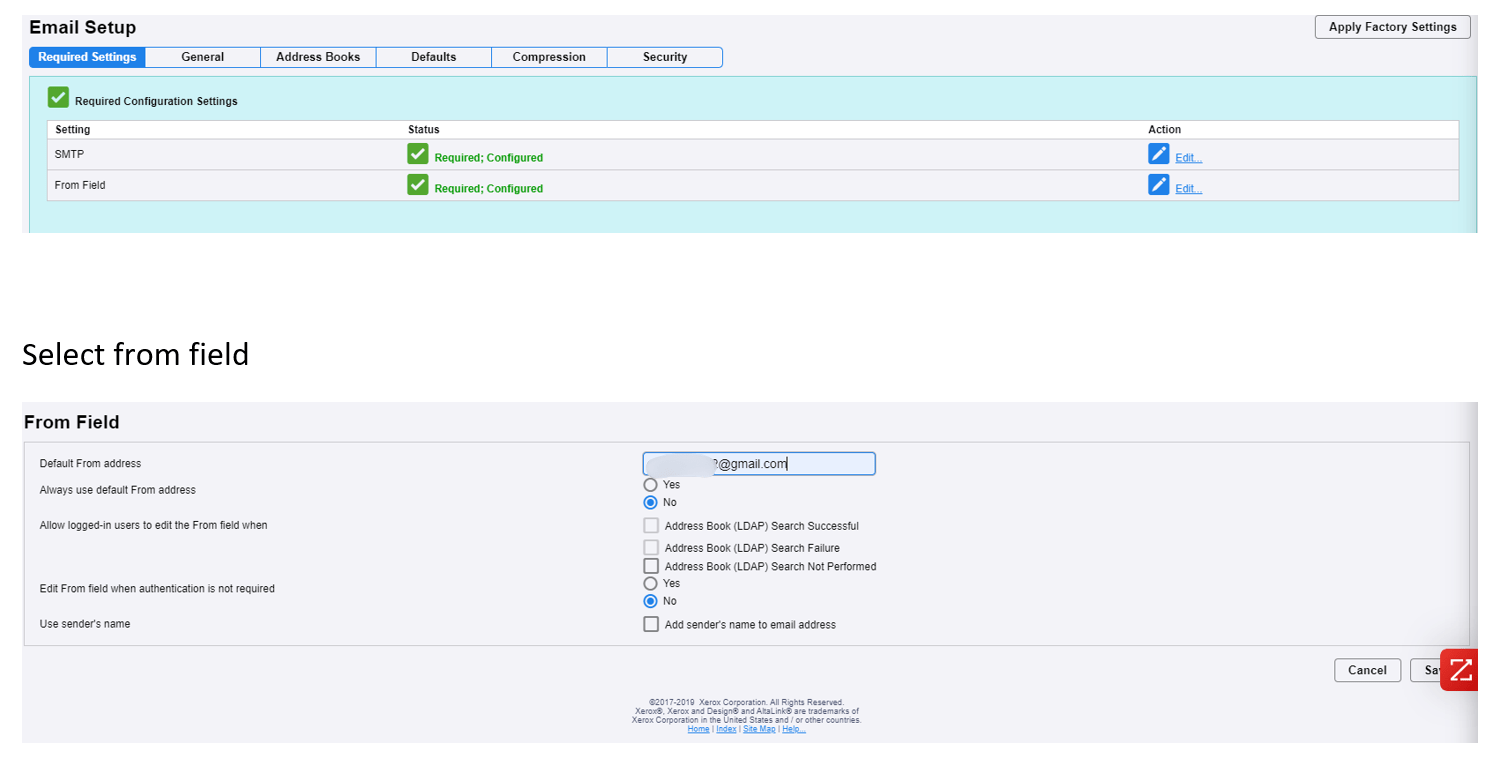
Confirm Email Address
Go back to:
Apps → Email → Setup
Confirm that the device email matches the one configured earlier.
If not, update them so they match.
DNS Settings
All your doing is confirming that the device email you put in earlier is the same as the one listed here if not change them to match, if your doing this for the first time it should be the same but if you changed it from something else to the smtpxerox22 then you will most likely need to correct this
Next, navigate to:
Connectivity → Setup → Wired Connection → Edit
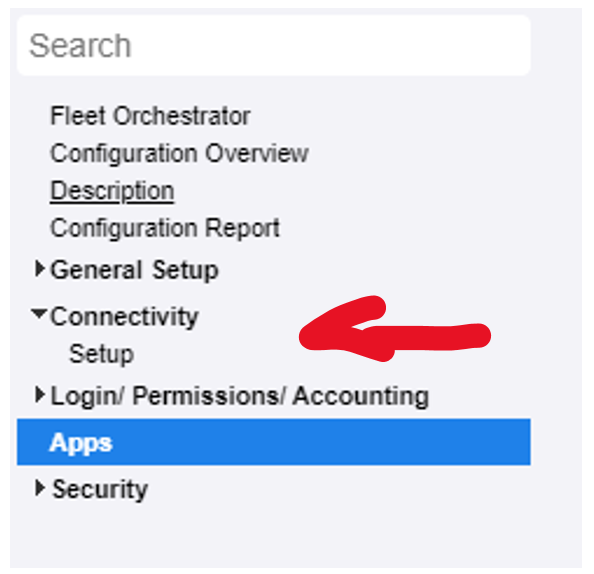
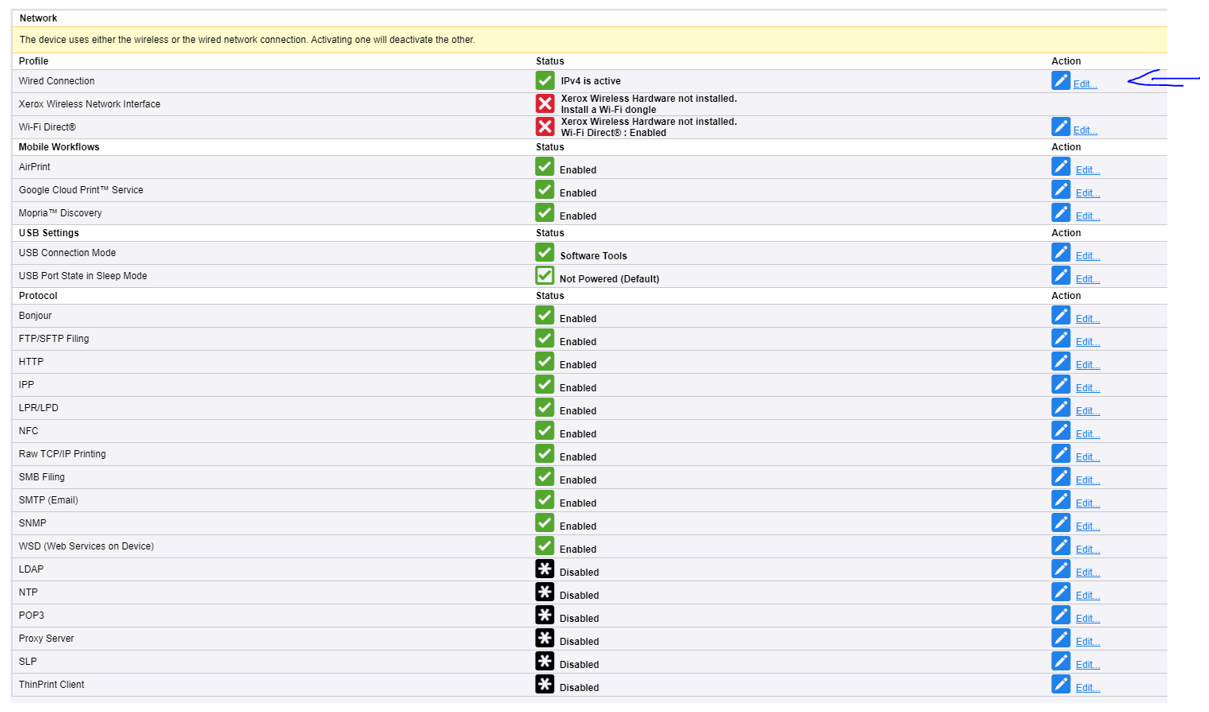
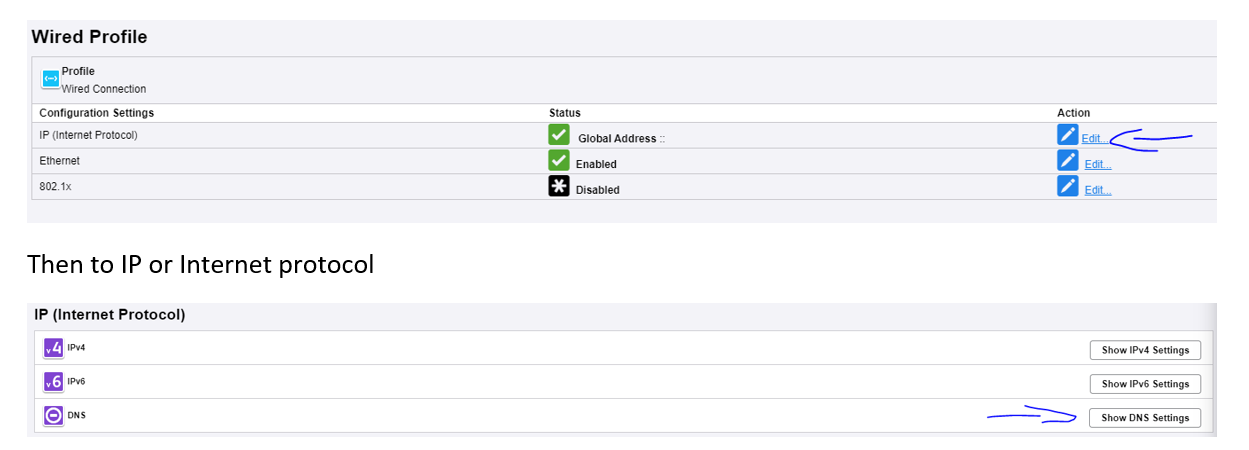
Then locate DNS settings (typically under IP settings).
This is what DNS settings may look like, but values will vary depending on the customer network.

There is an easy way to find this information
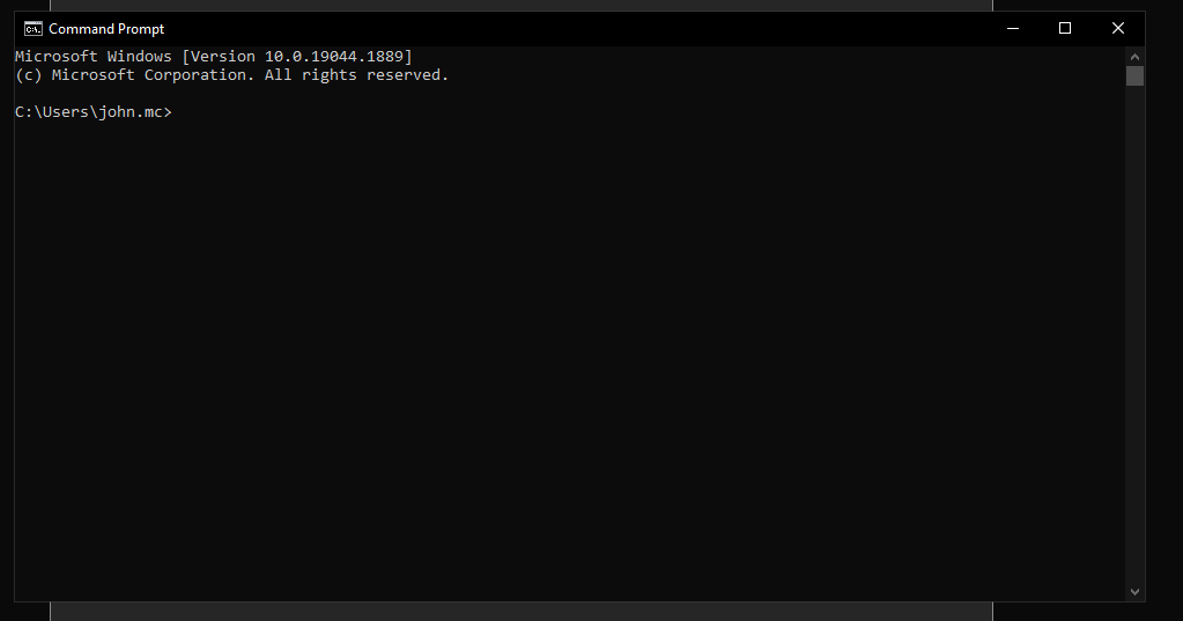
On the bottom left there is either a search bar a magnifying glass or a windows icon either one works type in command prompt and a black box should appear.
Finding DNS Information
On a Windows computer:
- Open Command Prompt

- Type:ipconfig /all; hit enter
- Look for:
- Connection-specific DNS Suffix
- DNS Servers

Enter:
DNS suffix → Requested domain name
DNS servers → Additional DNS server addresses
If DNS information is unavailable, consult your network administrator before entering values.
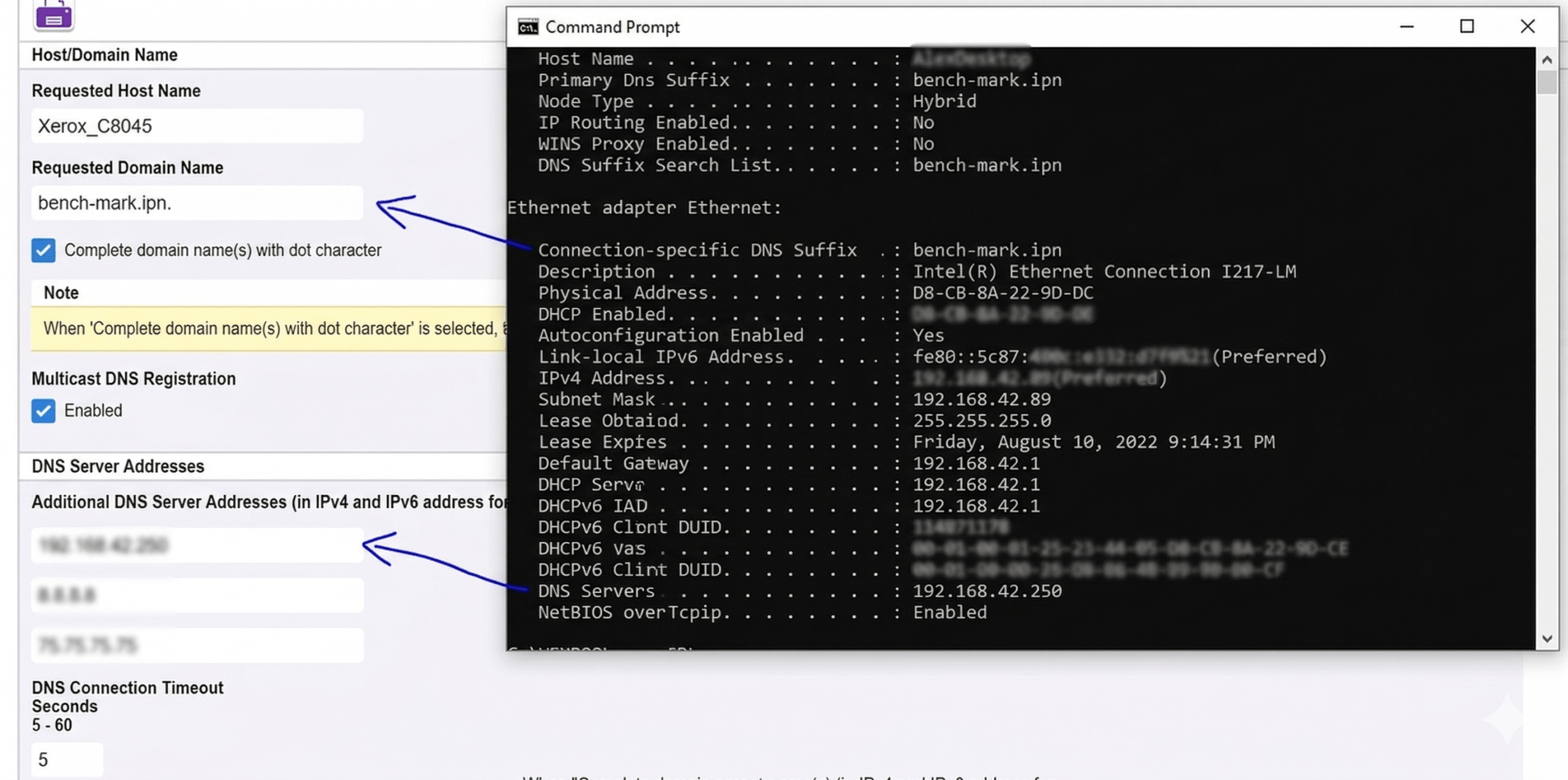
The requested host name should autofill so don’t change that also if there is only one dns server I recommend using some generic backups such as 8.8.8.8 75.75.75.75 75.75.76.76 all are good backups
If the DNS suffix is black put “local.domain” within the requested domain name because even if one does not exist it needs something in that field.
Final Step: Test Configuration
Go to:
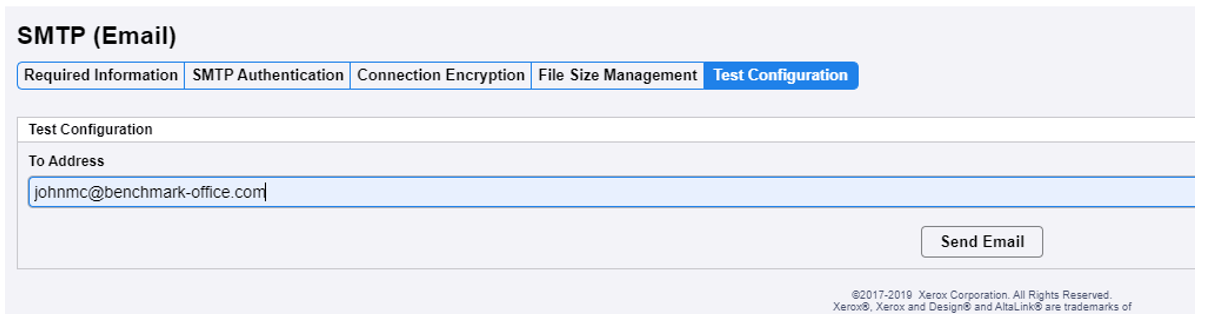
Apps → Email → Setup → SMTP → Edit → Test Configuration
Enter an email address to test. Click “send email.”
If successful, you’re all set.

If you get this yay you did it good job!!
Common Troubleshooting
If it says “Unable to connect to SMTP server”
- Recheck all previous steps
- Verify SMTP settings with your email provider
If “Unable to generate message body”
- Restart the machine so settings update
Final Note
Not all machines will look exactly the same, but all required information is included here. Navigation paths may vary slightly depending on the model.
Most user guides are available on the Xerox website support page by searching your model number followed by “user guide.”
Need help finding it? Call or email us.
Yes. Training is included with new installations, and refresher training is available for existing customers.
Need training? Call or email us.
You can share feedback directly with us or leave a Google review—we appreciate it.
Want to share feedback? Call or email us.
Benchmark Office has been in business since October 2000, making it over 25 years of providing technology solutions and services to our customers in New Hampshire and Massachusetts. We have built a strong reputation for our expertise in office solutions, including printers, copiers, workflow automation, and managed print services.
We primarily serve New England and support customers in seventeen states through on-site and depot service options.
Call or email us to find out how we can help you.
We have been in business for 25 years and our current location is 75 Gilcreast Road, Suite 311, Londonderry, NH 03053. You can find more information about our location on our contact page.
Yes, we provide professional installation and setup services for the equipment you order. You can order equipment by calling us, submitting an online form, or scheduling a consultation.
Call or email us to learn more about our installation services or submit a request online.
Smaller or in-stock machines may be delivered same or next day. Larger equipment typically arrives within a few business days.
Do you have delivery questions? Call or email us.
I was going to be wise and say you can telepathically send it, but seriously, you can call or email us or fill out the Customer Care form for supplies. Thank you for your business!
Absolutely! We have solutions for low volume to high volume. As the machines get faster, they can handle more volume and usually thicker stock as well. Products start with the Versalink series, then move up to the Altalink series, then Primelink series, and from there Versants or Iridesse machines for color. Just call or email us and we can find something to meet your needs.
Our solutions at Benchmark Office help strengthen document security and compliance through several key services:
- Xerox® Print Security Audit Service: This service manages print security across your entire fleet by conducting automated audits, monitoring compliance, and correcting any violations related to firmware updates, password management, and device configuration. It also provides ongoing reporting and alerts through an interactive dashboard to help you maintain strong security and compliance.
- Managed Print Services (MPS): MPS gives you greater visibility and control over document workflows and costs. It helps automate processes, increase productivity, and enhance document security. It also supports environmental sustainability, which is becoming an important compliance factor.
- Xerox® Workflow Central Platform: This platform provides secure, uninterrupted access to documents, enabling easy file conversion and applying enhanced security measures to protect sensitive information.
Call or email us to learn more about our Managed Print Services or request a security audit for your organization.
Yes. We provide tailored solutions for healthcare, education, legal, finance, construction, manufacturing, engineering, non-profits, and other industries, focusing on security, compliance, and efficiency.
Call or email us to learn about the solutions we offer for your specific industry.
Billing and account updates are handled directly by our team.
Need changes? Call or email us and we will handle your request promptly.
For technician ETA or ticket updates, please contact our office directly.
You can contact Benchmark customer support in several ways:
- Phone: Call us to talk to a specialist at (603) 890‑2474.
- Email: Send an email to info@benchmark‑office.com.
- Contact us online for more information or to request a quote.
Firmware updates are released periodically to resolve issues that may arise. We generally recommend updating only if you’re experiencing a problem that the update specifically addresses; otherwise, there’s a chance something else could be affected during the process.
You can update your printer’s firmware using the Firmware Connect App. This app automatically pushes system software updates to your ConnectKey‑enabled multifunction printers (MFPs), including fixes for operational issues, compatibility improvements, new features, and security patches. There’s no need to call the Service Desk or perform manual updates—the app handles everything for you.
Contact us to learn more about the Firmware Connect App.
Copiers and printers can jam for several reasons. Here are some possibilities:
- Paper mismatch.
- Did you tell the machine you loaded a thicker paper stock so it can make the proper adjustments?
- Has the paper absorbed moisture from humidity? Unfortunately, no make or model handles damp paper well. As a test, remove the paper from the tray and place it on a flat surface—do you see a “wave” in the paper, or is it curled? If so, it will likely jam. As a solution, you can flip the paper over, load only one ream at a time if it’s very humid, and keep the rest sealed in the box (or better yet, in plastic containers to keep humidity out).
- Did a label get stuck on a roller?
- Have the rollers worn down (like tires) and need replacement? They wear out over time due to use and temperature changes.
- Or just call us. We’ll help get the machine back up and running.
There are so many codes that could come up on a copier/printer that could just be informational or could require service. You could google the code with your model, for example, “Xerox C405 what does code xxxx mean,” or visit Xerox’s Knowledge Base for possible fixes.
Or give us a call and we’ll help troubleshoot over the phone — it may just be a simple issue like a paper mismatch.”
Promotions may include trade-ins or clearance equipment. Availability varies by timing and inventory.
Call or email us to learn about current offers that may apply to you.
Yes. Leasing is the most common option and typically offers the lowest monthly payments with a buyout option.
Ready t0 explore your options? Call or email us.
We offer purchase, lease, and rental options on both new and previously owned equipment.
Want pricing details? Call or email us.
Yes. Most of our devices support cloud and document management integrations. Our team will confirm compatibility.
Check out our products here.
Need integration help? Call or email us.
We provide both out-of-the-box and custom solutions to digitize documents, streamline processes, and securely manage files from any device.
Need guidance? Call or email us.
We offer customized workflow automation solutions, including digital forms, document conversion, AI-assisted workflows, and Xerox® Workflow Central for secure file access and conversion.
Want to learn more? Call or email us.
When possible, we try to accommodate same-day requests. Availability depends on inventory and service schedules.
Urgent request? Call or email us. You can order supplies through our Customer Care form.
If you’re under contract, toner ships automatically. Otherwise, contact us with your printer model and we’ll place the order for you.
Need supplies? Use Customer Care or call or email us.
Morning calls are often handled the same day. Afternoon requests are typically scheduled for the next business day. Urgent issues are prioritized whenever possible.
Need help now? Use Customer Care or call or email us.
Service can be requested by phone, email, or through our Customer Care page. Most visits are handled within the next business day.
Need service? Use Customer Care or call or email us.
We offer four flexible options:
• Time & Materials
• Supplies-Only
• Service-Only
• Managed Print Services (includes toner, parts, and labor)
Need plan details? See option comparisons here or Call or email us.
Yes. We provide color and black-and-white printers ranging from desktop models to production-level machines. Recommendations are based on volume, paper size, required functions, applications used, and budget.
Browse Color vs. Black and White Printers.
Not sure what fits? Call or email us.
Differences include color vs. black-and-white, supported paper sizes (such as 11×17), and monthly volume capacity. Higher-volume environments often require Xerox® AltaLink®, while lower-volume offices are well served by VersaLink®. Today’s copiers can also support advanced workflows and software integrations.
Need help choosing? Call or email us.
Using AI for document management and processing helps businesses work faster, smarter, and with fewer errors. AI eliminates the need for manual data entry by automatically reading and understanding documents — whether they’re scanned, emailed, or uploaded. This streamlines workflows, reduces turnaround times, and improves accuracy across departments.
With solutions like Xerox® Intelligent Document Processing, businesses also gain real-time visibility into their document workflows. AI-powered classification, extraction, and validation ensure that the right data reaches the right system instantly. The result is better productivity, stronger compliance, and more time for teams to focus on higher-value work instead of paperwork.
AI document processing solutions — like Xerox® Intelligent Document Processing (IDP) — improve accuracy by learning from data over time. Unlike traditional rule-based systems, which rely on fixed templates, AI uses machine learning and natural language processing to recognize patterns, context, and variations in real-world documents.
That means even if an invoice layout changes or a form includes new terminology, the system can still identify and extract the correct information. Xerox IDP also applies built-in validation rules and confidence scoring to catch inconsistencies before data enters your business systems, reducing manual corrections and improving reliability across every workflow.
You can explore demos of Xerox® Intelligent Document Processing (IDP) directly through authorized Xerox partners like Benchmark Office Systems. We can walk you through live demonstrations that show how AI captures and classifies real-world business documents — such as invoices, contracts, or forms — and integrates that data into your existing systems.
These demos highlight exactly how automation and intelligence work together in action, helping you see the time savings and accuracy improvements firsthand. To schedule a personalized walkthrough or request a sample workflow demo, simply contact Benchmark — we’ll tailor it to your industry and document needs.
Traditional Optical Character Recognition (OCR) simply converts printed text into digital characters — it reads but doesn’t understand. Xerox IDP goes further by applying artificial intelligence, natural language processing, and machine learning to interpret what that text means. It can identify document types, extract contextually relevant data, and even validate information automatically. In other words, OCR turns text into data; IDP turns data into usable business insight.
With Xerox IDP, security is built in from the start. Documents and extracted data are processed within secure, compliant environments that align with strict enterprise standards. Encryption, access controls, and audit trails protect sensitive information throughout its lifecycle. Since many organizations handle confidential or regulated documents, Xerox also supports on-premises and hybrid deployment options to keep your data where you need it — and under your control.
Xerox Intelligent Document Processing can handle almost any kind of document your business encounters — structured, semi-structured, or unstructured. That includes invoices, purchase orders, contracts, HR forms, applications, delivery slips, and even handwritten documents. Whether they arrive as paper scans, PDFs, or email attachments, Xerox IDP uses AI-powered recognition to read, classify, and extract the right information so it can move directly into your workflow.
Implementing AI-based Intelligent Document Processing (IDP) starts with understanding where your organization’s document challenges exist — and how automation can relieve them. For most businesses, the best place to begin is by identifying the document-heavy workflows that slow down operations or rely on manual data entry, such as invoice processing, HR onboarding, purchase orders, or client intake forms.
With Xerox® IDP, the process is straightforward and scalable:
Identify the Use Case
Begin by mapping out where your teams spend the most time managing documents. Xerox experts can help analyze your current processes to pinpoint where intelligent automation will deliver the fastest ROI.
Digitize and Capture
Paper and electronic documents are brought into a single workflow. Xerox’s AI-powered capture tools can read a wide variety of formats — PDFs, scans, emails, and handwritten forms — converting them into structured digital data.
Train the System with AI
Using built-in machine learning, Xerox IDP recognizes and extracts key information (names, dates, totals, customer details, etc.) with increasing accuracy over time. It adapts automatically to different layouts or document types without heavy manual configuration.
Integrate with Your Existing Systems
The extracted data flows seamlessly into your business applications — whether that’s ERP, CRM, accounting software, or your document management system. Xerox’s open architecture makes integration simple and secure.
Monitor and Optimize
Dashboards and analytics give you real-time visibility into workflow performance. As your system learns from new documents, accuracy and efficiency continue to improve.
The result? Faster turnaround times, fewer errors, and more time for your team to focus on higher-value work.
Xerox IDP is designed to fit the way your business already operates — not the other way around. Implementation doesn’t require an overhaul of your systems or a steep learning curve. It’s about starting small, automating the right processes, and scaling as your needs grow.
If you’re ready to explore how Xerox Intelligent Document Processing can simplify your document workflows, Benchmark can help you take the next step with a guided discovery and implementation plan. Contact us today.
1. Managed Print Contract (Most Popular)
- All toner and supplies
- Automatic toner shipments based on usage
-
All service calls, labor, and maintenance
-
Priority scheduling for service calls
- Replacement of standard wear-and-tear parts
- On-site support from certified technicians
-
No minimum print requirements
2. Supplies-Only Contract
- Toner and consumable supplies
- Automatic shipping based on your print volume
- No service or maintenance coverage
3. Service-Only Contract (Warranty-Style)
- On-site service and labor
- Coverage for non-consumable parts
- Support for qualified devices (typically Xerox machines within service age limits)
4. Time & Materials (T&M) / No-Contract Support
- On-demand service and support
- Billed per service call (labor + parts if needed)
- No contract or automatic supplies
Managed print and some warranty contracts do. Note: Xerox warranties exclude consumables.
Yes! Our four main service plans include:
- Time & Materials (T&M): Pay-as-needed service/supplies.
- Supplies-Only Contract
- Service-Only Contract (warranty-style)
- Managed Print Contract: Covers all service, supplies, and parts.
For details, visit our Managed Print Services page.
Note: Pricing will vary due to print volume, device, and consumable costs. Call 603-890-2474, email us at info@benchmark-office.com, or contact us online for more information on plans.
We aim to schedule an on-site visit by the next business day after your request. Call 603-890-2474, info@benchmark-office.com, or use the online customer care form.
Options: Call 603-890-2474, info@benchmark-office.com, or use the online customer care form. Our goal is to offer next-day service.
If under one of our MPS contracts, toner is shipped automatically. If not, please contact us.
Note: “Parts” usually require service calls, and Benchmark doesn’t sell non-consumable parts directly.
Yes. We offer genuine Xerox® products and supplies as well as compatible options, depending on your preferences. Please contact us for details.
We typically offer next-business-day delivery. In special cases, same-day delivery may be possible for local customers. Please contact us for availability.
- All toner and supplies
- Automatic toner shipments based on usage
-
All service calls, labor, and maintenance
-
Priority scheduling for service calls
- Replacement of standard wear-and-tear parts
- On-site support from certified technicians
-
No minimum print requirements
- Toner and consumable supplies
- Automatic shipping based on your print volume
- No service or maintenance coverage
- On-site service and labor
- Coverage for non-consumable parts
- Support for qualified devices (typically Xerox machines within service age limits)
- On-demand service and support
- Billed per service call (labor + parts if needed)
- No contract or automatic supplies
We offer four service plan options:
1. Time & Materials (T&M) – Pay-as-you-go.
2. Supplies-Only Contract
3. Service-Only Contract – Like a warranty.
4. Managed Print Contract – Covers service, parts, and supplies.
Pricing is customized by device type, usage, and location. See our managed print services page for details.
We aim to provide on-site visits by the next business day. You can schedule service by calling, emailing info@benchmark-office, or using our online customer care form.
You can schedule service by calling, emailing info@benchmark-office, or using our online customer care form. We aim to provide on-site visits by the next business day.
Managed Print Services (MPS) covers toner, service, parts, and labor with no minimum volume requirement. It’s designed to reduce costs and simplify print management. Pricing includes a monthly base fee plus a per-page rate, which varies by print volume and device. Learn more about our managed print services here.
For a personalized quote, contact us at (603) 890-2474 or email info@benchmark-office.com. You may also request a callback by sharing your name and number.
Yes! We aim to provide on-site visits by the next business day.
To speak with a specialist, call (603) 890-2474 or email info@benchmark-office.com (Mon–Fri, 8:30am–5:00pm ET). You may also request a callback by sharing your name and number.
We offer a range of Xerox business machines, including multifunction printers, production copiers, and wide-format devices. Our product recommendations depend on your printing needs. You can browse new Xerox models or clearance models on our website, or use our chat feature for more help.
We offer a range of Xerox business machines, including multifunction printers, production copiers, and wide-format devices. Our product recommendations depend on your printing needs. You can browse new Xerox models or clearance models on our website, or use our chat feature for more help.
Yes. Benchmark Office Systems provides copier and printer service for small businesses in Nashua, including support, maintenance, supplies, and Managed Print Services.
Absolutely. We offer flexible service contracts for businesses in Nashua that include routine maintenance, priority repair services, and discounts on supplies and repairs.
Managed Print Services streamline your printing operations by managing equipment, monitoring usage, reducing costs, and automatically replenishing supplies like toner and paper. This ensures your office equipment runs smoothly with minimal intervention.
Our office printer service covers cleaning, software updates, troubleshooting, and repairs. We also provide recommendations for optimizing your printer’s performance and reducing downtime.
Regular maintenance is typically recommended every 3–6 months, depending on your equipment usage. This helps prevent breakdowns and extends the lifespan of your devices.
Yes, we offer a wide range of office supplies, including toner cartridges, paper, and other essentials, to keep your copiers and printers running efficiently. We also provide automatic supply replenishment as part of our Managed Print Services.
Common signs include frequent paper jams, streaks on printed pages, slow performance, or error messages. If your copier experiences these issues regularly, our repair services or recommendations for a replacement can save you time and money.
Service response times depend on technician availability and the nature of the issue, but we provide responsive local support throughout Nashua and Southern New Hampshire.
We provide copier repair, printer repair, routine maintenance, and office printer services to ensure your equipment stays in peak condition. Additionally, we supply office supplies and toner for your machines.
Yes. Benchmark Office Systems provides copier and printer service for small businesses in Andover, including maintenance, repair, toner support, and Managed Print Services.
Absolutely. We offer flexible service contracts for businesses in Andover that include routine maintenance, priority repair services, and discounts on supplies and repairs.
Managed Print Services help businesses reduce downtime, improve visibility into print costs, simplify toner management, and optimize office printing environments.
Our office printer service covers cleaning, software updates, troubleshooting, and repairs. We also provide recommendations for optimizing your printer’s performance and reducing downtime.
Regular maintenance is typically recommended every 3–6 months, depending on your equipment usage. This helps prevent breakdowns and extends the lifespan of your devices.
Yes, we offer a wide range of office supplies, including toner cartridges, paper, and other essentials, to keep your copiers and printers running efficiently. We also provide automatic supply replenishment as part of our Managed Print Services.
Signs may include:
- Frequent paper jams
- Recurring service calls
- Poor print quality
- Slow performance
- Outdated scanning or security features
- Rising repair costs
Service response times depend on technician scheduling and the nature of the issue, but we provide responsive local service throughout Andover and nearby communities.
We provide copier repair, printer repair, routine maintenance, and office printer services to ensure your equipment stays in peak condition. Additionally, we supply office supplies and toner for your machines.
Benchmark Office Systems offers personalized MPS plans tailored to your business needs. Our local team ensures prompt support, detailed reporting, and cost-effective solutions for businesses in Nashua and throughout New Hampshire.
Yes, supply management is a key part of Managed Print Services. We monitor your devices and automatically deliver toner, paper, and other supplies when needed, so you never run out.
As part of our Managed Print Services, we provide proactive maintenance and fast repair services. Our team serves Nashua, New Hampshire to ensure minimal downtime and keeps your operations running smoothly.
We use advanced software to track device usage, identify inefficiencies, and provide detailed reporting. This helps us recommend improvements and adjust your Managed Print Services plan as needed.
Absolutely. Managed Print Services reduce waste by promoting efficient printing practices, enabling duplex printing, and managing supply usage. These measures contribute to your company’s environmental goals.
Managed Print Services reduces costs by eliminating unnecessary printing, optimizing device usage, and consolidating print fleets. Additionally, automated supply replenishment ensures you never overstock or run out of essentials like toner.
Yes, our MPS solutions are scalable and tailored to Nashua businesses of all sizes, including small businesses. We provide cost-effective plans that align with your specific needs and budget.
Managed Print Services (MPS) cover all major printing devices, including copiers, printers, multifunction devices, and scanners. We also support various brands such as Xerox, Canon, Ricoh, and HP.
MPS helps Nashua businesses reduce printing costs, minimize downtime, enhance document security, and gain better control over print usage. It allows your team to focus on core tasks while we handle your print infrastructure.
Benchmark Office Systems offers personalized MPS plans tailored to your Andover business needs. Our local team ensures prompt support, detailed reporting, and cost-effective solutions for businesses throughout Massachusetts.
Yes, supply management is a key part of MPS. We monitor your devices and automatically deliver toner, paper, and other supplies when needed, so you never run out.
As part of our Managed Print Services, we provide proactive maintenance and fast repair services. Our team in Massachusetts ensures minimal downtime and keeps your operations running smoothly.
We use advanced software to track device usage, identify inefficiencies, and provide detailed reporting. This helps us recommend improvements and adjust your MPS plan as needed.
Absolutely. MPS reduces waste by promoting efficient printing practices, enabling duplex printing, and managing supply usage. These measures contribute to your company’s environmental goals.
Managed Print Services reduce costs by eliminating unnecessary printing, optimizing device usage, and consolidating print fleets. Additionally, automated supply replenishment ensures you never overstock or run out of essentials like toner.
Yes, our MPS solutions are scalable and tailored to Andover businesses of all sizes, including small businesses. We provide cost-effective plans that align with your specific needs and budget.
MPS covers all major printing devices, including copiers, printers, multifunction devices, and scanners. We also support various brands such as Xerox, Canon, Ricoh, and HP.
MPS helps Andover, MA businesses reduce printing costs, minimize downtime, enhance document security, and gain better control over print usage. It allows your team to focus on core tasks while we handle your print infrastructure.
Yes, we offer delivery and professional installation for all copier and printer purchases in Nashua, NH. Our team ensures your equipment is set up and ready to use, and we provide training if needed.
Managed Print Services help businesses optimize their printing environment by providing insights into usage, reducing costs, and ensuring proactive maintenance. When you buy a copier or printer from us, MPS can be added to streamline operations and keep your devices running smoothly.
All our new copiers and printers come with manufacturer warranties, and we offer extended warranty plans for added peace of mind. Refurbished equipment also comes with a limited warranty.
Yes, we provide certified refurbished copiers and printers that are thoroughly tested and come with warranties. This option is great for businesses seeking cost-effective solutions.
The size depends on your print volume, the number of users, and the types of documents you print. High-volume businesses may need larger, faster models, while small offices can benefit from compact, desktop units.
Most modern office copiers are multifunction systems that include printing, scanning, and copying features. Office printers are often designed primarily for printing tasks.
Yes. Leasing helps many businesses reduce upfront costs while maintaining predictable monthly expenses.
Yes. We provide Xerox multifunction printers that can print, copy, scan, and fax from a single device.
Benchmark Office Systems is an authorized Xerox partner offering Xerox copier and printer solutions for business environments.
Important considerations include:
- Print volume
- Number of users
- Color printing needs
- Scanning workflows
- Security requirements
- Total cost of ownership
- Future growth plans
Absolutely. We offer flexible service contracts tailored to Andover businesses that include routine maintenance, priority repair services, and discounts on supplies and repairs. Our service territory covering both southern New Hampshire and northeastern Massachusetts means you’ll never be left without support, even if your business operates in multiple locations throughout the region.
Andover businesses enrolled in our Managed Print Services enjoy streamlined printing operations with equipment management, usage monitoring, cost reduction, and automatic supply replenishment. This service is particularly valuable for growing companies in the Andover business corridor who need to maintain focus on their core business rather than printer management. Several local financial services and healthcare providers have reduced their printing costs by 20-30% through our program.
Our office printer service for Andover businesses covers comprehensive cleaning, software updates, troubleshooting, and repairs. We’re familiar with the specific networking environments common in Andover office buildings and can ensure your printers work seamlessly with your existing IT infrastructure. We also provide recommendations for optimizing your printer’s performance to reduce downtime.
For the typical Andover business environment, regular maintenance is recommended every 3-4 months, though this may vary based on your equipment usage and environment. Businesses near construction areas or manufacturing facilities in Andover may benefit from more frequent service. This preventive approach helps avoid breakdowns during critical business periods and extends the lifespan of your devices.
You don’t need to drive to big box stores in North Andover or Tewksbury—we deliver a wide range of office supplies directly to your Andover business, including toner cartridges, paper, and other essentials to keep your copiers and printers running efficiently. We also provide automatic supply replenishment as part of our Managed Print Services, which is particularly popular with professional offices in Brickstone Square.
Common signs include frequent paper jams, streaks on printed pages, slow performance, or recurring error messages. If your copier experiences these issues regularly, especially in high-humidity conditions common near the Merrimack River, our repair services or recommendations for a replacement can save you time and money. Many Andover businesses find that older machines struggle with the area’s seasonal temperature variations.
Yes, we prioritize quick response times for Andover businesses. With our proximity to major routes like I-93 and Route 28, our technicians can typically reach most Andover locations within hours. For businesses in Andover’s business district and industrial parks, we strive to provide same-day repairs when calls are received before noon.
We provide comprehensive copier repair, printer repair, routine maintenance, and office printer services throughout Andover and neighboring communities. Our local technicians are familiar with the unique needs of businesses in the 01810 area, ensuring your equipment stays in peak condition. We also supply office supplies and toner for both Xerox and other major brands.
Yes, we provide delivery and professional installation for all copier and printer purchases in Andover, MA. Our team ensures your equipment is set up correctly and ready to use, and we offer training if needed.
Managed Print Services streamline your printing environment by providing insights into usage, reducing costs, and ensuring proactive maintenance. Adding MPS to your copier or printer purchase can help keep your operations efficient and your devices running smoothly.
Our new copiers and printers come with manufacturer warranties, and we also offer extended warranty plans for additional peace of mind. Refurbished equipment is covered by a limited warranty.
Yes, we provide certified refurbished equipment that has been thoroughly tested and comes with warranties, offering a cost-effective option for businesses.
Consider your print volume, the number of users, and the types of documents you print. High-volume businesses may require larger, faster models, while smaller offices might benefit from compact, desktop units.
Absolutely! We provide flexible leasing options, allowing you to spread out costs or test equipment before making a long-term commitment.
Yes! Our multifunction printers combine printing, scanning, copying, and faxing in one device, making them ideal for businesses aiming to save space and enhance efficiency.
We proudly carry industry-leading Xerox copiers and printers, ensuring you get reliable, high-performance equipment.
Key factors include print volume, color versus black-and-white capabilities, multifunction features (e.g., scanning, copying, faxing), speed, connectivity options, and long-term maintenance costs. Our team is ready to guide you to the best option for your business.


